10 gigabit (10Gb) home network – Zone 2 switch – Part 1

Build Log:

With the first zone effectively done, it was time to plan the second switch. The requirements here are a little more involved than the Zone 1 switch:

  • 10GbE uplink to Zone 1
  • 2x10GbE connections for Mira and Absinthe
  • Multiple 1GbE connections with Auto-MDIX
  • Wireless support to create a hotspot

To this end, this is the main system hardware:

  • CPU: AMD FX-8350
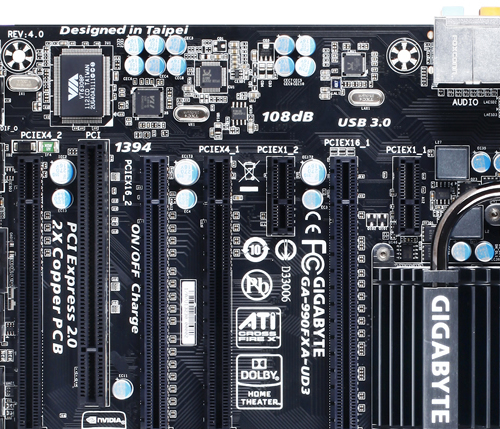
  • Mainboard: Gigabyte 990FXA-UD3
  • Memory: 2x4GB DDR3
  • Storage: SanDisk Cruzer Fit 16GB USB 2.0
  • Graphics: nVidia GeForce2 MX400 PCI

Networking hardware:

The mainboard has a PCI-Express configuration to support this setup. The 990FXA-UD3 mainboard has two each of x16, x4, and x1 PCI-Express 2.0 slots, which would support this configuration:

  • x16 – Mellanox ConnectX-2
  • x1 – TP-Link AC1900
  • x4 – Quad-port Gigabit
  • x16 – Mellanox ConnectX-2
  • PCI – GeForce2 MX400

Mmm…. look at all those expansion slots, just waiting to have something… inserted into them.

And for this switch I’ve opted to use an old PCI graphics card, a GeForce2 MX400. I think that chipset came out around the time my oldest niece was born (she’s 15 as of when I write this). I bought it when I was still in college as an upgrade for a Riva TNT AGP card, opting for the PCI version since it was less expensive than the AGP version when I bought it. The PCI card will keep the last x4 slot open.

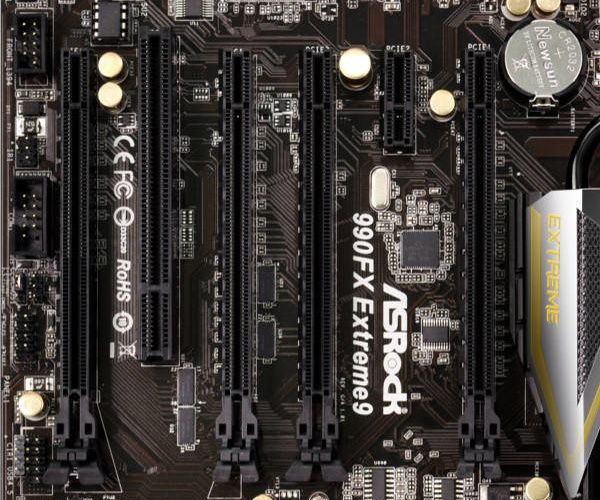
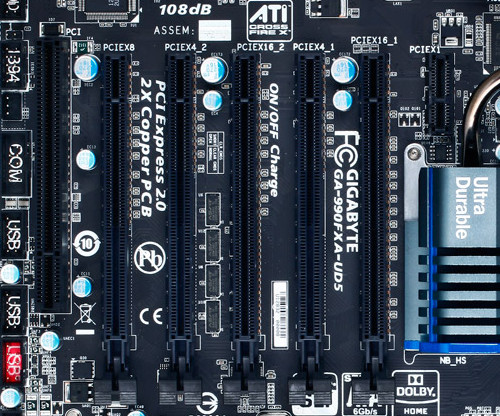
If I needed three dual-port 10GbE cards, I could’ve used the Gigabyte 990FXA-UD5. It has a primary x16 slot and two x8 slots while still having two x4 slots, a x1, and a PCI slot. The position of the x1 slot limits you to short cards. The ASRock 990FX Extreme9 has a similar slot configuration but only one x4 slot as it has 6 slots overall. But the x1 slot is better positioned for longer cards, such as the intended AC1900.
For cables and transceivers, I went back to Fiber Store. This time the order was for six (6) 10GBase-SR transceivers and three LC to LC OM4 optical fiber cables: two 10m cables for connecting Mira and Absinthe to the switch, and a 30m cable for connecting Zone 2 to Zone 1.


Intel PRO/1000

One lesson I learned in this is to not use the Intel PRO/1000 chipset Ethernet adapters. In doing some research, I found one comment on Amazon that alludes to this chipset not supporting anything other than PCI-E 1.0. A Reddit thread alludes to the same. So if your mainboard can downgrade specific slots to older PCI-E standards, you may be good, but it’s no guarantee.

In the case of the 990FX, you’re out of luck. It wouldn’t light up for me, and under Linux would not show up in the lspci device listing. I’ll try it later with one of the Athlon X2 boards I have to see if it’ll light up there, though I’m not sure what I’d do with it if it does. Perhaps use it to create a master for a small cluster.

So if you’re going to look for a quad-port Ethernet card, stay away from the Intel PRO/1000 PT cards you can find all over eBay unless you can confirm compatibility with the mainboard you’re intending to use.

Buying surplus retired server hardware can come with a few gambles. And apparently with some chipsets, you need to be aware of Chinese fakes.

Mellanox ConnectX-2

A lot of Mellanox cards you’ll find on the market are OEM cards, so compatibility with the Mellanox drivers may not be guaranteed across all platforms. The listings should have the part number in the title or somewhere in the body to allow you to research. Unfortunately information on specific part numbers can be sparse. Thankfully you’re likely to find specific part numbers on any sale listings.

Look for the Mellanox-specific model numbers to ensure the greatest chance of getting ones that will work: MNPH29-XTR for a dual-port ConnectX-2 card, or MNPA19-XTR for a single-port. On the Zone 1 switch, I mentioned another part number that saw success: 81Y1541, which is a dual-port ConnectX-2 OEM-branded by IBM.

Part number 59Y1906, also OEM-branded IBM, gave me nothing but trouble. The Mellanox EN driver for Fedora 24 refused to do anything with either card. The default mlnx4_core driver that comes with Fedora 24 and the latest kernel continually displayed error messages to the screen about a command failing. Installing the Mellanox EN driver only made things worse. And all of the Mellanox tools for querying the device returned the error code MFE_UNSUPPORTED_DEVICE.

Despite the A1 sticker on the card, all utilities that could read the data from the card showed the chip revision to be A0. And that I think is the reason the Mellanox utilities refused to support it.

Interestingly they did work under Windows 10 with the latest Mellanox WinOFED driver (WinOF 5.22). Or at least they weren’t giving me errors continually. If I had both cards plugged in, though, one would fail to operate with Windows reporting a Code 43. I think the problem there might have been the fact it was not Windows Server, and I didn’t try them with Windows Server.

So if you obtain that part number, be aware that you may not be able to use it under Linux, but you should be able to use it under Windows. Just make sure to install the latest WinOFED driver to get all the configuration features that are available. The command-line utilities under Windows also reported them as being unsupported even though the drivers appeared operational.

There may be other part numbers that may or may not work, so do some quick research before buying to save yourself the headache I’ve endured.

Blending in

Given this one will be near our entertainment center, I opted toward an HTPC chassis to blend in. Specifically I went with the Silverstone GD09.
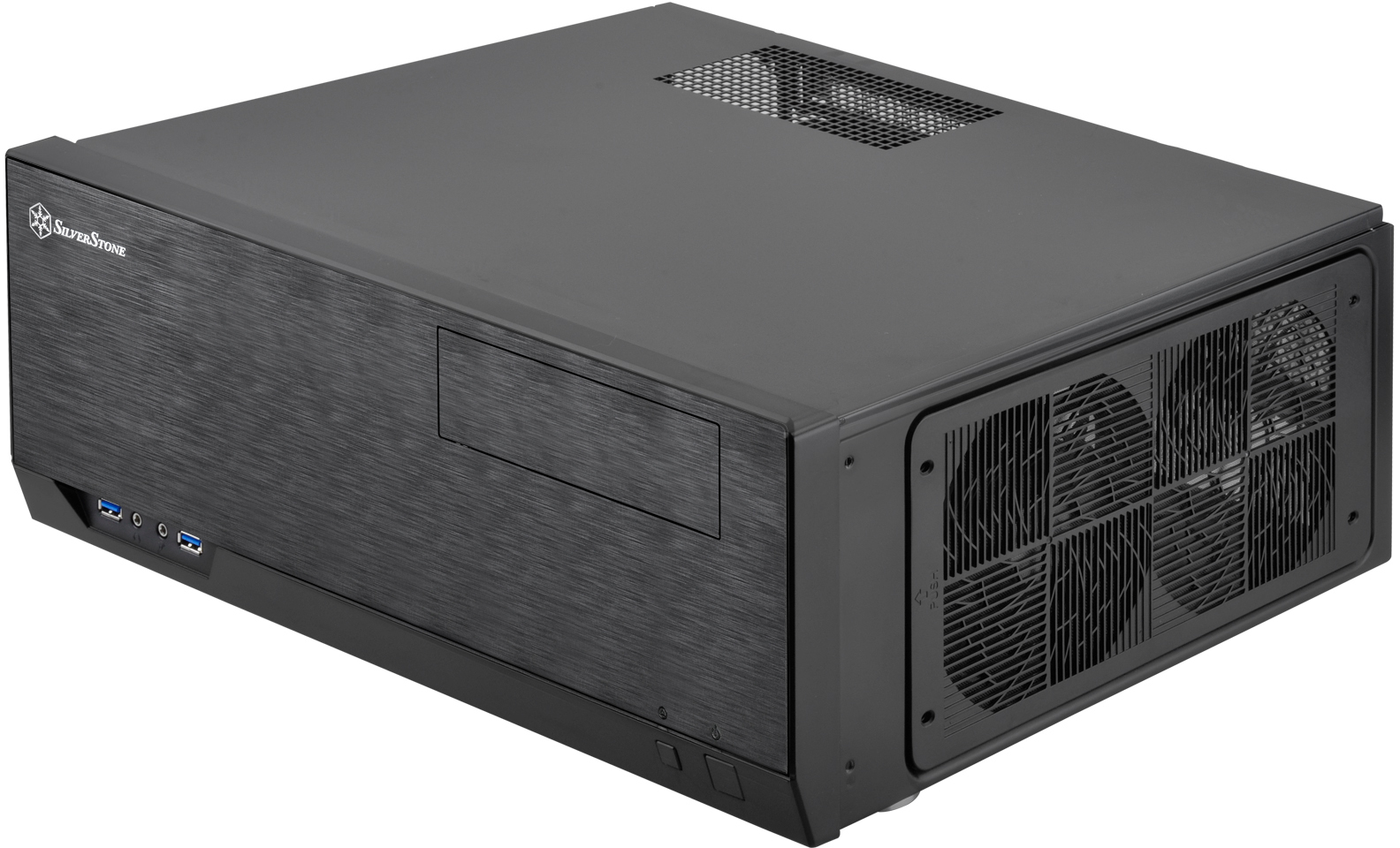
I’m not too fond of the potential airflow options. But this chassis actually has an expansion slot situated above the other expansion slots:
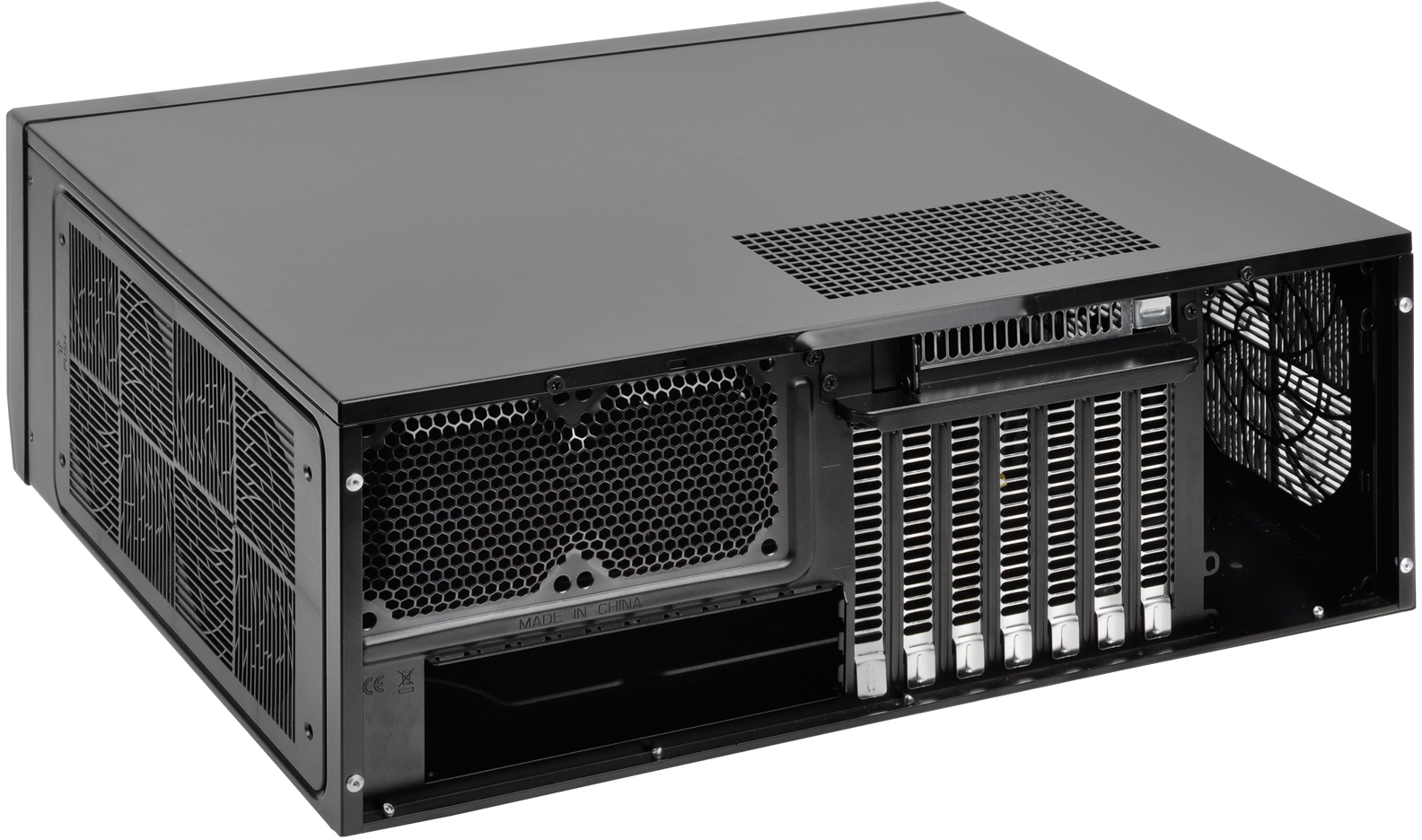
A rather interesting position. And actually the perfect position for a slot bracket for fans, such as what you can find on modDIY. The grill is wide enough for an 80mm fan, but too slim for anything larger. A better option is using expansion slot fan mounts that mount above the cards, such as this other one from modDIY (check eBay for better prices), to mount a pair of 60mm or 70mm fans above the cards to take advantage of the width of the vent for overall better airflow.

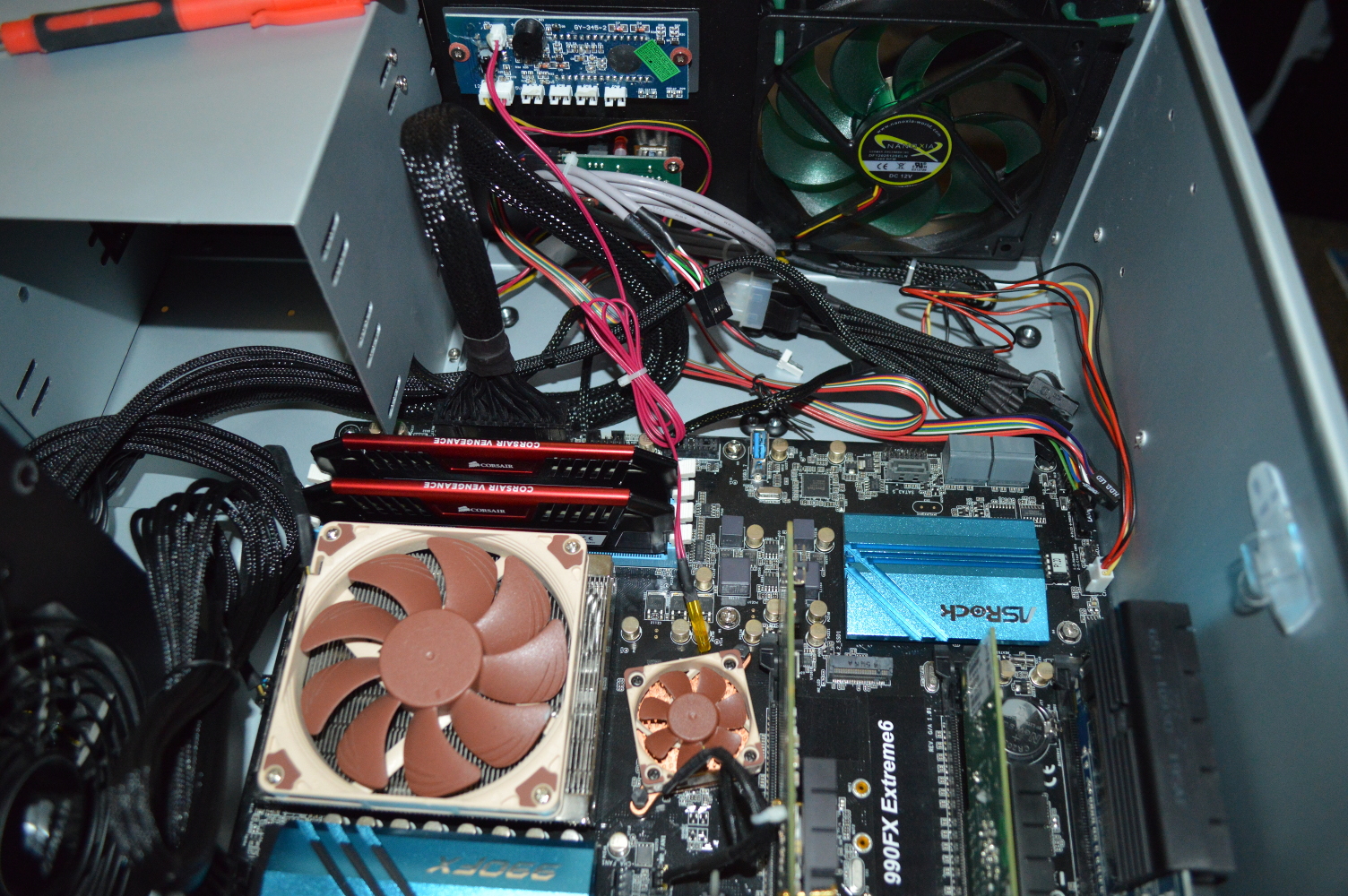
And the fan positions over the mainboard I/O are 80mm. All other fan positions are 120mm. The cards on the test bench show as well how important cooling will be for this setup.
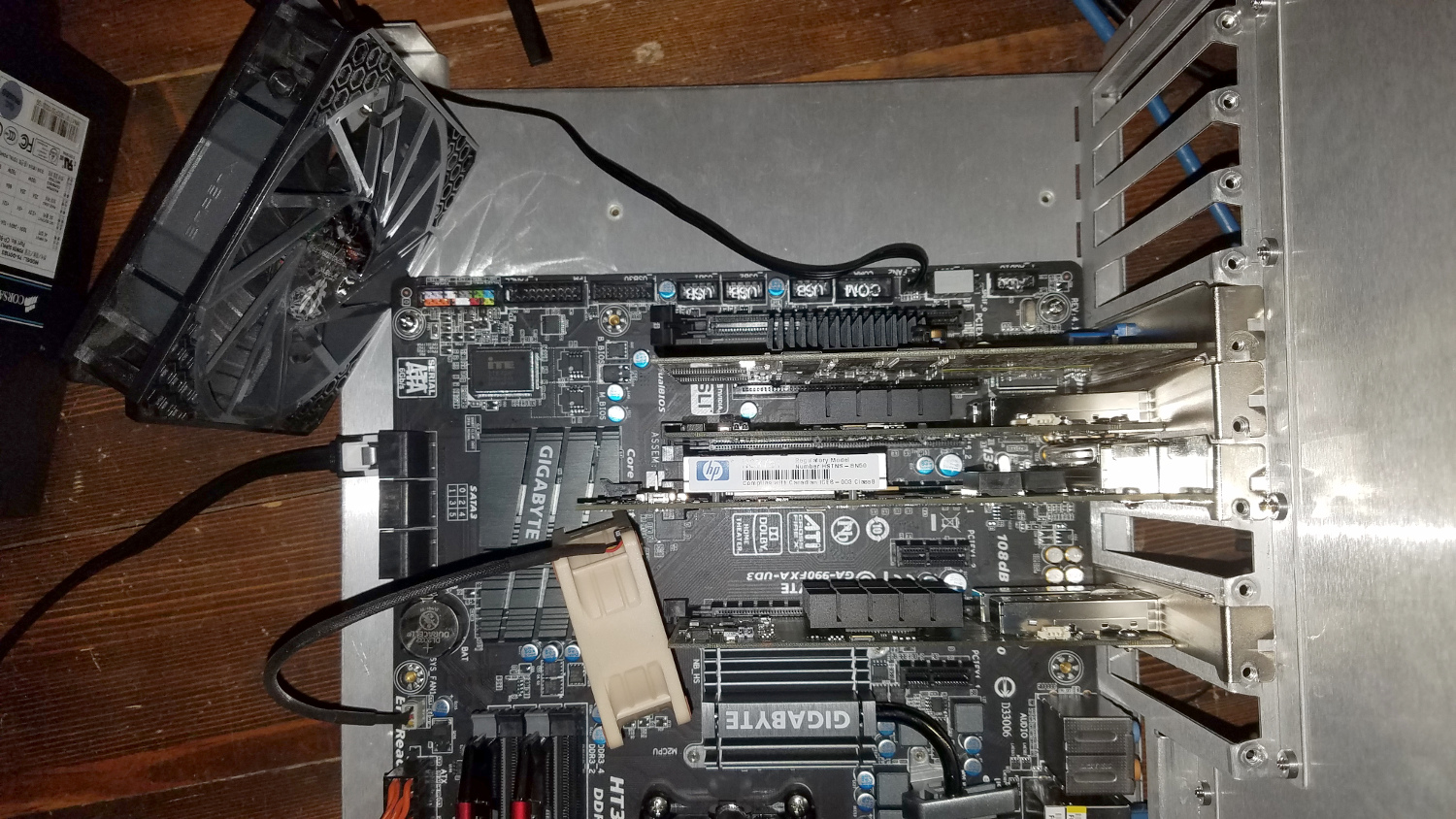
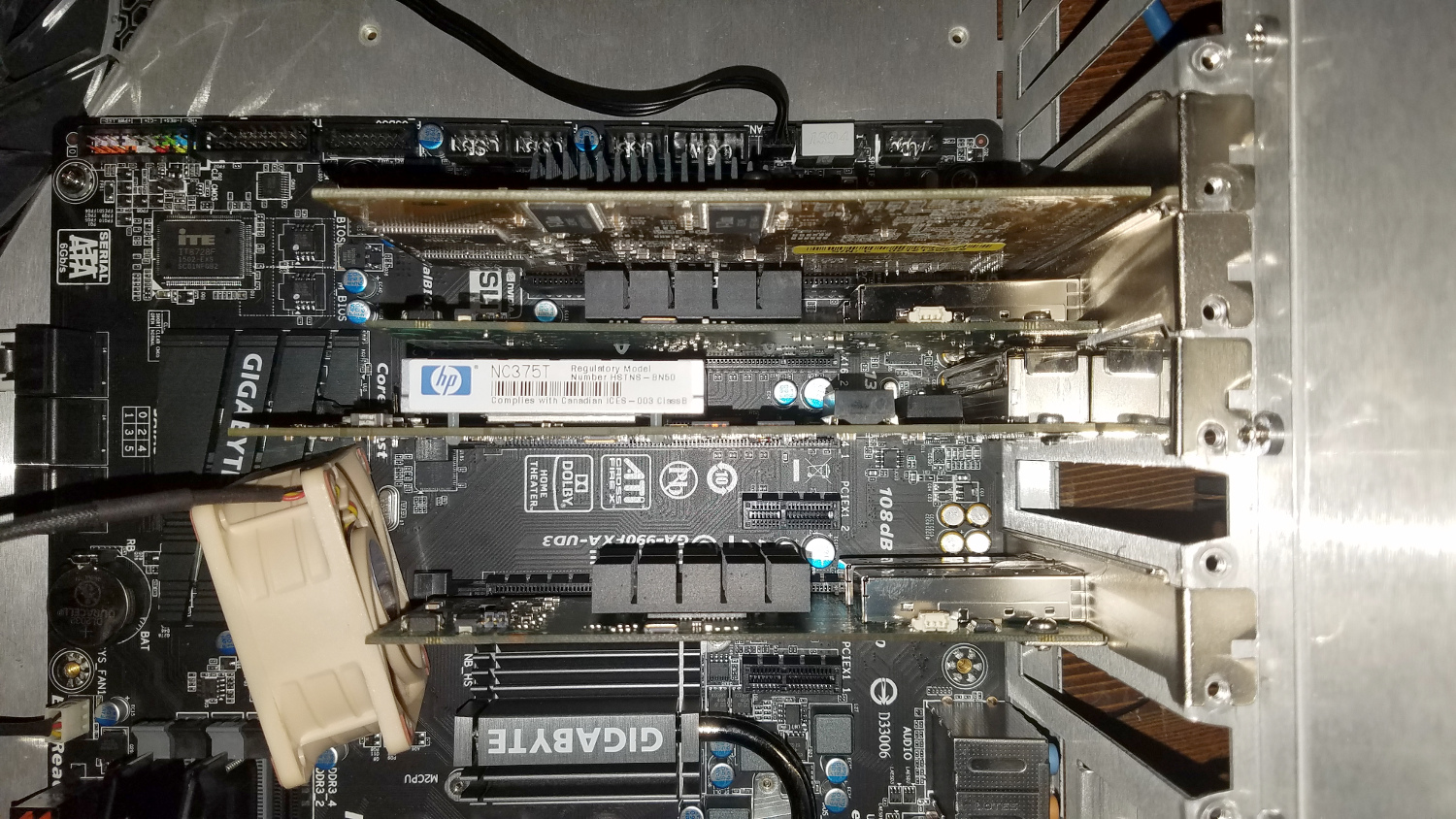
And while the cross flow isn’t the greatest on the Silverstone GD09, there are ways of maneuvering the air where I need it. Specifically I may be able to use the 120mm fan mount that is adjacent to the power supply as an intake with a duct (such as this one from Akust) to direct air onto the cards.

Continuing…

That’s it for now. I’m waiting for the last of the hardware to arrive from Fiber Store.

The power supply I have planned for this is also an RMA I’m waiting to receive from EVGA. Unfortunately they aren’t going to resume any shipments until January 3, 2017. I may shortcut that and just buy another power supply from Micro Center, since I also still need to buy the USB drive. We’ll see. But for now this is where I’ll leave it.
Electoral College math experiment

With a lot of buzz going about the Electoral College and the fact that Trump won the electoral vote despite Clinton winning the popular vote, I opted to conduct a little experiment. I used the poll numbers available from the New York Times as of December 23, 2016, when this article was published. I realize they’re not the final, official numbers, but likely close enough for this experiment, and the final numbers are unlikely to change the outcomes, though I’m willing to revisit this when those numbers are readily available.

Now I’ve advocated for the Nebraska model to become universal with regard to how the electoral votes are divvied up. Nebraska I believe divides by congressional district or population, with the popular vote winner getting the two votes representing the Senate. As such, though the State almost always goes Republican, the Democrats can usually expect to pick up a vote from that State.

So if the Nebraska model were universal, and presuming they divide the electoral votes by population with the two Senate votes going to the population winner which will about represent the congressional district model, what would be the totals? Note: some rounding errors had to be corrected manually for this result, but the outcomes were not affected by the corrections.

  • Trump: 272
  • Clinton: 258
  • Johnson: 7
  • McMullen: 1 (Utah)

Trump would still win, but only just barely. And Clinton would’ve had more votes overall due to picking up votes in Texas and Florida, but would’ve lost votes in California and New York. McMullen you’ll see would’ve picked up an electoral vote in Utah, and that would’ve been due to his close run behind Clinton in that State. Trump would’ve picked up the remaining two population votes and the two Senate votes.

Also worth noting is that Clinton and Trump would’ve had votes in every State with the exception of the 7 States plus the District of Columbia that are allocated only three votes.

Now what if the popular vote was divvied up entirely by population. Would Clinton have won the electoral vote since she also won the popular vote? No.

  • Trump: 263
  • Clinton: 266
  • Johnson: 8
  • McMullen: 1 (Utah)

Clinton would’ve won the plurality, but no candidate would’ve won a clear majority. This vote result would’ve gone to the House to resolve, and at one vote per State, it likely would’ve gone to Trump.

The electoral college exists, in part, to lessen the capability of one State to control the outcome of the election for President. In both scenarios above, and in the actual outcome, that purpose is well served. Clinton’s popular vote win is fueled largely by her win in California, where she won by a larger vote margin than she did in the overall popular vote. And she won California by a vote count that surpasses the populations of about half the States in the United States.

One must also remember that the United States is not and never has been a democracy. We are a federated republic of independent, sovereign States. And the electoral vote system preserves that. The electoral vote system would stop serving that purpose if the 12 largest States all banded together to select the President, regardless of who the other States selected.

Now what about close races? Let’s look at 2000, pulling the official tallies from the Federal Election Commission. In that outcome, going by the Nebraska model, same presumption, this would’ve been the Electoral College result:

  • Bush: 275
  • Gore: 258
  • Nader: 5

The result is a little more interesting if you divide the electoral vote proportional to the popular vote:

  • Bush: 263
  • Gore: 269
  • Nader: 6

That vote would’ve gone to the House, and given the breakdown of the 107th Congress, it could’ve gone either way.

And if you really want to see how much it neutralizes the power of the largest States, let’s look at the 1972 election. In that election, Richard Nixon won 520 of the available 538 electoral votes. What would’ve been the result had the Nebraska model been in play at that time (actual total in parentheses)?

  • Nixon: 366 (520)
  • McGovern: 165 (17)
  • Schmitz: 1 (0)

Now that’s a striking difference. Nixon’s lead is cut down enormously, and John Schmitz of California, running as an American Independent, would’ve received 1 electoral vote from California. The result is still the same, and Nixon still wins by over 200 votes, but it would not have been anywhere near the landslide it was.

And we can see similar results with the 1984 election of Ronald Reagan vs. Walter Mondale, which is a larger landslide than Nixon’s re-election in 1972 and the largest victory margin since the 1788 and 1792 elections of George Washington. Again, applying the Nebraska model to the popular vote (actual in parentheses):

  • Reagan: 352 (525)
  • Mondale: 186 (13)

Again, very striking difference. Result is still the same with Reagan winning by nearly 2 to 1 in the electoral vote count, but that’s much more reflective of his actual popular vote margin of 58.8%, instead of winning under 60% of the popular vote but carrying almost 98% of the electoral college.

But clearly the case here is that the Nebraska model allows for third parties to pick up votes (provided the base votes are divided by overall popular vote instead of by congressional district), while also allowing both parties to pick up votes in most States. So it’s a much more fair breakdown in my opinion while still also preventing what could be a lot of elections being decided by the House of Representatives. It also diminishes the power of the largest States in the election.

Now again the numbers represented herein are presuming that the popular vote about proportionally represents how congressional districts would have voted. I’m aware that gerrymandering could affect this result. I’ll revisit this later once I have better numbers.

Another pass by Mira

Build Log:

Well the time has come again to take another pass by the distant binary star system Mira… Okay, perhaps not. Instead the time has come to revisit the computer system that I’ve called Mira: an Intel i7-5820k built into the NZXT H440 with water cooling provided by a custom radiator box.

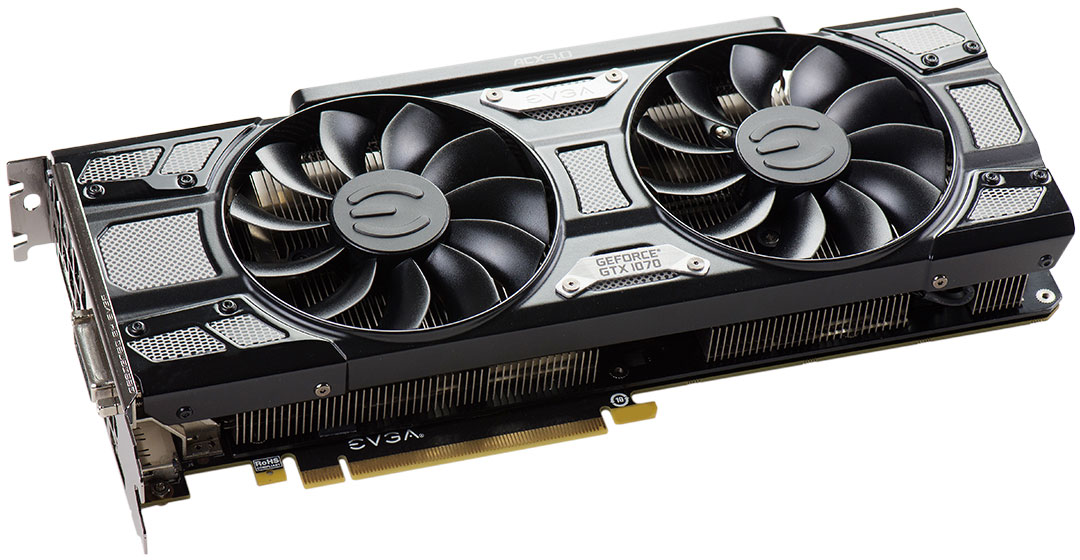
Last we left, I mentioned the desire to upgrade the graphics cards in Mira away from the pair of PNY GTX 770s (which are basically the same as a pair of GTX 680s) for something a bit more recent. In my wife’s sytem Absinthe, I upgraded her to the GTX 1080, but I’m not going that high. I stayed one step lower and went with the GTX 1070. Specifically the EVGA GTX 1070 SC Black Edition.

When installed it’ll put the CPU as the only hot item on 9x120mm of radiator space until I get a water block. The temperatures are already phenomenal (38C average core temperature while encoding video), so I’m not expecting much improvement on that. Going from dual graphics cards to a single GTX 1070 will also free up a slot on the mainboard for a 10GbE SFP+ card as part of my 10GbE home network upgrade.

Cable management will need to be redone in the H440 as well since I’ll be going from two graphics cards requiring four PCI-E power connectors to one graphics card requiring just one 8-pin connector.

I’m also taking this as an opportunity to revisit the radiator box. Again. This time it’ll be with the aim of silencing the D5 Strong pump.

I ordered an anti-vibration pad and I’ve been looking at other ideas for vibration isolation with the intent of doing what I can to isolate the pump. One idea I’m currently entertaining is using the pad as a base for creating a small bag for enclosing the pump entirely, with the hope of not only isolating it for vibration but also any sound. I derived this idea from the YouTube channel DIY Perks. In his video about an ultra-silent PC build called “Cloud Unit” (embedded below), Matt housed a laptop HDD in a small bag made from an old towel to absorb sound and vibration.

There’s not nearly the concern about heat with a D5 pump since it’s designed to dump its heat into the fluid it’s pumping.

And while silence would certainly be golden, vibration is the thing to tackle first. And there are a lot of products and entire companies out there for this purpose. You’re probably familiar with the anti-vibration pads, washers, and the like. I’ve attempted to use plumbing washers for anti-vibration as well — they work well for a D5 Vario, but not so well for the D5 Strong.

There’s also a plethora of fasteners designed for isolation. It’s just a matter of what’s available and compatible with the pump housings and the setup in question. Again there are a lot of products available for isolation, some that may not look all that great in a computer build, so plenty of research to be done in the interim. But for now I’m going to see how well the anti-vibration pad I purchased will work while considering other ideas. At under 5 USD, it’s an inexpensive experiment that should give some value.

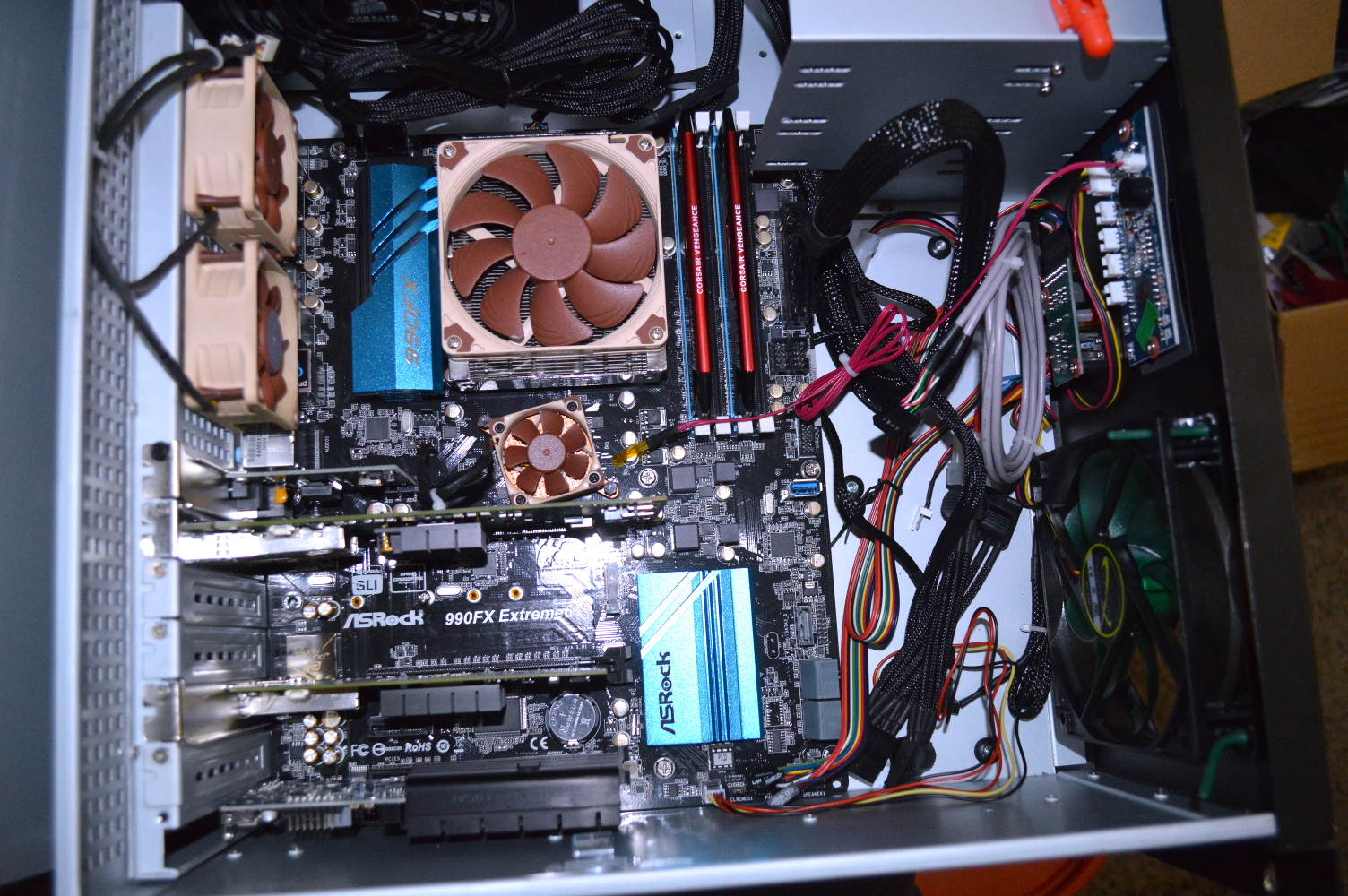
The new GTX 1070 is sitting in a test setup as well to make sure it’ll work as expected and determine the extent of any coil whine. The hope is anticipating a potential RMA before tearing down Mira. The test setup is an FX-8350 on a 990FX mainboard that will be used for a second 10GbE switch in my home network once the last of that hardware arrives.

One interesting observation to make: while running Valley or Heaven Benchmark, the fan never started on the 800W power supply I’m using to power the test setup. It’s certainly great to see that NVIDIA’s Pascal GPU core can provide greater performance over Maxwell (with the GTX 1070 outpacing even the Titan X Maxwell) at significantly reduced power requirements. In initial testing, the GPU core never broke 70C with EVGA’s ACX 3.0 cooler.

White Lightning – Finished

While it happened in December, the upgrade to this system occurred a little sooner than I expected. The ASRock mainboard with the A8-7600 just would not remain stable. And then what forced my hand is the power supply dying. Thankfully EVGA makes RMAs easy. But I didn’t wait for the RMA to turn around. I just bought another power supply from my local Micro Center and went on with the build.

So with that, I pushed forward. System specifications:

  • CPU: AMD Athlon X4 860k
  • Cooling: Corsair H115i with Corsair Link
  • Memory: 4x4GB EVGA DDR3-1600 (running at XMP profile)
  • Mainboard: Gigabyte GA-F2A88X-D3HP
  • Graphics: Gigabyte RX 470 Windforce 4G
  • Power supply: EVGA 650 G2
  • Storage: Kingston UV400 480GB SSD
  • Chassis: NZXT S340 White

Philosophy

I’ve gotten into quite a few… conversations online about the Athlon X4 processor. Namely by people who feel that the processor should not be used in any system since Skylake is available. One person resorted to insults when I wouldn’t bow to his obviously lesser-experienced and overly narrow-minded opinion.

Every system has a budget. The question is whether it will allow building a system meeting your specific requirements or desires. And in my opinion, if you’re going out of your way to get a particular processor and you end up skimping on parts that are, frankly, a hell of a lot more important overall, you’re doing it wrong. I said such to one of my adversaries on YouTube with regard to Skylake specifically:

But pushing for a quality power supply and reasonable chassis could push other options out of reach. I mean if you’re so focused on getting someone Skylake within their limited budget that you skimp on the power supply, memory capacity, cooling, or other things that are, frankly, more important, then you’re doing it wrong.

This is especially the case if you have never built a system before, meaning you are starting from scratch. As such, you’ll want to set yourself up for the long term by selecting a good chassis allowing for good cooling (plenty of options today compared with years past) and a quality power supply.

At the same time, set yourself up with a good CPU cooler. Almost all have universal socket support, and thankfully AMD and Intel have been consistent in socket designs for mounting hardware. It’s not an essential purchase at the outset, though, if your budget won’t allow for it. It’s just that the stock cooler that comes with the CPU tends to be loud or annoying, not adequate, or both.

The power supply will matter more. A good power supply with a great warranty and a company that stands behind that warranty with good RMA service will keep you running smoothly for years. And I opted for the EVGA G2 brand for its 10 year warranty. Plus, as noted above, I have experience with EVGA’s RMA process. Corsair’s as well.

Select a mediocre chassis and you’ll set yourself up for frustration not only building your first computer, but upgrading it in the future. In trying to find a chassis, select one that will serve you for the long run. There are many good selections available regardless of what size system you want to build. A lot of that has been fueled by healthy competition in the PC building market over the last several years as more move away from buying pre-built PCs to building their own.

Why the Athlon X4?

I know that when most see this particular hardware pairing — or an AMD processor used at all — the word “bottleneck” gets screamed. And as I’ve said before, you have to look at how the system will be used.

World of Warcraft will be the most taxing thing this system will run, and it likely still won’t tax it that much since WoW’s system requirements are such to cast a wide net of players. This system won’t be used for AAA titles. The GPU selection is more to make it look pretty, and I selected it primarily due to cost. It is an overkill GPU for this purpose, but that also means it shouldn’t ever run all that hot. I probably could’ve left the GTX 660 in her system without issue, except I wanted that card back.

NZXT S340 mini review

Like it’s bigger brother the H440, the S340 is an interesting chassis in which to build. It’s a great value while still having room for the massive dual-140mm H115i.

Cable management behind the motherboard tray is reasonable as well, and the cabin at the bottom for the power supply aids in this somewhat. The vertical white bar in the white version gives a great way to hide cables as well. You still have to plan your cable management, though, so don’t think this allows you to get away with a sloppy job.

But there is no ventilation for the 3½” HDD cage in the basement. That HDD cage is also not removable. This is a poor design decision given that modern HDDs still run rather warm when excited. So if you intend to use an HDD for this build, opt to a 2½” laptop HDD to have it up in the main compartment. Laptop HDDs and SSDs are also designed to run with less airflow, so you can use a 2½” to 3½” sled in the HDD cage to have it out of the way.

The little sister to the H440 is still a great option for lighter builds. A full ATX mainboard looks a little cramped in this setup, though, so opt for a microATX mainboard unless you need the extra slots. That will also allow for better reach to the front panel connectors while still giving good clearance around the rest of the hardware.

Overall I would certainly still prefer and recommend the larger H440 to the S340 since it also has more fan capacity (S340 only has four fan mount positions). But if space is a little bit of a premium around your desk, this is still a great option at a great price. The included fans can be a little noisy running at a full 12V, so consider undervolting them or hooking them to the mainboard to control noise. Or you can swap them out altogether for a quieter option.

Next setup

There is a companion system planned. The mainboard and processor will be the same, but the chassis will be different. Since the chassis can dictate cooling options, that also means the CPU cooler will be different, but I’m not entirely sure what I’m going to do. I might lean toward an AIO again, or I’ll find a good, quiet air cooler, such as the Noctua NH-D9L that I’m currently using in my NAS.

The power supply will likely be the same, or I may lean toward another brand while sticking with the same wattage. And I’ll likely also pick up another RX 470 for that build, depending on what prices look like for other GPUs.

The chassis isn’t set in stone for that build. I’m leaning toward the InWin 303, also white. But since desk space is at a heavier premium than around this system, I may opt for an HTPC chassis such as the Silverstone GD09, or even go ultra-SFF with the Node 202, which would require a different mainboard and power supply.

So stay tuned for that build.

My Christmas rant…

(Note: I originally wrote this in 2009. Opted against updating the dates.)

Over the years, I’ve stepped back and thought about what Christmas has become. Like many things, Christmas originally started out as something simpler, certainly nowhere near the corporatized behemoth into which it has grown.

To me Christmas is nothing more than an opportunity to drive around the Midwest to see family and friends. The possibility I may receive gifts is a bonus, but nothing more, and not something I expect. If I can afford to give, I will. Needless to say, and my mother I’m sure will agree with this, I am not the same person I was growing up.

Yet I look around both where I previously lived and where I currently live, and I wonder why everyone else’s perception of Christmas is quite the opposite.

Christmas in this society appears to have become the epitome of selfishness and competition. Friends, both young and old, have verbal competitions over what they “got”. People “want” this and they “want” that and they are upset, especially kids, if they don’t get what they wanted, and especially upset if they don’t get anything at all. And they are also more than willing to run themselves into debt in order to satisfy these wants along with their own.

There are Christians all across the country screaming “Put Christ back into Christmas” while swiping credit and debit cards, draining bank accounts and racking up large amounts of debt, and for what? Hypocrisy? You cannot scream “Put Christ back into Christmas” and spend yourself blind without looking like a fool. You are only being as materialistic as Jesus warned against. He preached humility and charity, not materialism.

Personally it would not bother me if my family opted to not exchange gifts, as they did in 2004. Truthfully over the years it has actually become my preference. I would still travel to see my family, not only because that is what Christmas is really about, in my opinion, but also because I’ve grown up on my father’s Christmas cooking, and well… I think you get the idea. The last couple years, whenever my family has asked me what I “want” for Christmas, I instead ask that they focus on what they feel I might need. Last year that was definitely the case given the hard times my wife and I were going through.

And now that times are better, my wife and I are humble. We have few wants and little needs, and we are living below our means, a trend I hope will continue through 2010 as we hunker down and start to get aggressive on our debts. All that we really want is to be better prepared for the future, and we hope we have learned from any mistakes of the past.

If you are afraid that your children won’t like or love you unless you get them something for Christmas, you need to re-think how you’re parenting your children. And don’t tell me that “I’ll understand when I’m a parent”, because basically what you’re saying is “I don’t know how to respond to what you’ve said, so I’m instead going to just tell you to shut up and hope you do.”

And before I part, I have one other group to address…

Atheists, please do us all a favor and shut the fuck up. No one cares (except you) if the current Christmas traditions are derived from the pagan traditions around the winter solstice. If you’re offended because someone decides to say “merry Christmas” to you instead of “happy holidays”, perhaps you need to get yourself checked out. And while you’re getting yourself checked out, be sure to have a glance at the calendar so you can see what the recognized name for December 25th happens to be.

The fact that you are buying presents for your children while screaming “I object” with regard to Christmas and its various and varying traditions only makes you look like a hypocrite. “No, it’s because of religion in schools and religion-this and religion-that that my kids expect presents on Christmas.” (I’ve actually heard an atheist say this to me.) Uh no, it’s because of a little thing called marketing. And one question: you give in why?

It’s all marketing, just like it’s marketing that will be bringing us Valentine’s candy and merchandise at Wal-Mart shortly after New Years (if not next week). It’s because of marketing that Christmas stuff has been on display since Halloween (and in some cases earlier) and Halloween stuff was on display after Labor Day when all of the “Back to School” sales ended. Do you understand?

So please, sit down, shut up, have a candy cane and peppermint schnapps, take a breather, then get back out there and swipe your credit card like everyone else

You’re a libertarian, not a libertarian feminist

Over at Libertarianism.org, Sharon Presley has written several articles on what she dubs “libertarian feminism“. Yet if you read through her articles, she is still just talking about libertarianism. In reading through them myself, I kept wondering when she was going to differentiate libertarian feminism from libertarian philosophy and feminism.

Libertarianism, in a nutshell, is the philosophy wherein it is immoral to initiate force against someone else except where necessity dictates. And necessity is defined very narrowly — e.g. self defense or defense of others, generally.

Feminism at its core is the political philosophy wherein women should have equal political, social, and economic opportunities to men. Patriarchy in feminism is the adversity, wherein women in general do not have such opportunities. Note the phrase “in general”. A woman choosing to be a stay-at-home mother and wife does not mean she is unable to choose a different path in life, only unwilling.

Yet in modern feminism, any woman who doesn’t have high individual aspirations is somehow evidence that women in general do not have opportunities. Somehow a stay-at-home mother is evidence of patriarchy, but women like Sharyl Sandberg are not, while Carly Fiorina is evidence of patriarchy since she’s a Republican. And many well-funded feminist activists continue to espouse the notions that women somehow today do not have the same opportunities merely because the outcomes aren’t as equal as they’d like.

But in Presley’s attempt to clarify the definition of libertarian feminism, she still fails to provide a distinction between libertarian feminism and libertarian philosophy. In general libertarian philosophy is the rejection of any philosophies that provide for any restriction on a person’s liberties and opportunities. The only viable restrictions on a person’s opportunities are those following from a natural order. For example you cannot take advantage of opportunities in New York City if you have no way of getting there as opposed to the government not allowing you to go there.

Like other feminists, we reject gender role stereotypes that limit women’s and men’s psychological autonomy to be what they individually choose to be. Like other feminists, we agree that both women and men have been harmed by these stereotypes. It is our belief in individualism that leads us to reject the notion of gender role stereotypes or any other stereotype that limits individual choice.

And this is also libertarian just as much as it is feminist. The only thing that pins this to feminism is the modern feminist and “social justice warrior” obsession with gender and how men and women have typically lived (as opposed to being forced under pain of reprisal to live a particular way).

Bigotry is a violation of the precepts of individualism.

Not quite. And the implication is the actual violation.

Bigotry is defined as the “stubborn and complete intolerance of any creed, belief, or opinion that differs from one’s own.” A person is free under libertarian philosophy to be a bigot, to completely reject or even be hostile toward any “creed, belief, or opinion that differs from one’s own”, so long as that person is not trying to force his particular opinions and beliefs on others.

If a man wants to believe that a woman’s place is in the kitchen, he is free to believe that. It is the libertarian who leaves him free to live with that belief. And if he finds a woman who is willing to go along with that belief and be your typical 1950s housewife, that is her choice as well. So long as no one forces her to live that life, and she is free to change that way of life or escape it if change is not possible.

On a personal and psychological level as well, we believe in the autonomy of the individual and the right of each individual to make choices about her/his life as they see fit. As noted in my prior essay here, on this issue, we follow in the philosophical footsteps of the individualist feminists who have come before us.

Individualist feminists were concerned with breaking the societal barriers that locked women into a particular way of life. For some women life was still good. For others, not so much. And women who sought to improve their station in life were met with resistance in many ways.

But again I fail to see where this differs from libertarianism.

A patriarchal society is one in which there is a male-dominated power structure both in organized society and in individual relationships. Rather than saying that individual men oppress women, most feminists assert that oppression of women comes from the underlying bias of a patriarchal society. That is, the social structure of patriarchal societies implicitly, and sometimes explicitly, define women as secondary to men, and as obligated to defer to men in matters of importance.

Patriarchy means, in short, that men make all the rules. The parallel, then, is a matriarchy, meaning that women make all the rules. That is the reason many push back with the assertion that the United States and much of the western world are not patriarchal. If men and women both can participate in the creation and modification of rules over that society, it is, by definition, not patriarchal or matriarchal.

The fact that existing rules may have been originally created exclusively by men does not make a society de facto patriarchal so long as women have the ability to assent to or change the standing rules and laws. The only way a society can be considered patriarchal is if the rules governing that society are made by men only, and women have no say in the matter, and no ability to change the rules as they stand.

This distinction is absolutely necessary, and one that is sorely lost on today’s modern feminists.

If a person is making an assertion that something or other is “evidence of patriarchy”, but not linking that assertion in the least to the making of laws and regulations over society, then it is not evidence of patriarchy at all.

Men today do not have exclusive rule and law-making authority at any level of government in the Western world.

Indeed the Constitution of the United States explicitly disavows any patriarchal setup for the Federal government by explicitly excluding from qualification for any office or trust at the Federal level any restriction on the basis of gender. This is further articulated by the Fourteenth Amendment and later by the Nineteenth Amendment with regard to suffrage. As such, since women could always be included into membership in Congress under the Constitution, could be elected President, could be appointed to any office of trust, the United States has never been a patriarchy.

Individual States, however, is where claims of patriarchy find merit, since there were laws at the State and local level that severely restricted the individual rights and freedoms of women because they are women.

But most discussions of “patriarchy” have little to do with rule-making authority and more to do with population demographics within societal roles. If we don’t have 50% gender representation in every walk of life (except roles like garbage collectors, mind you), then patriarchy still exists according to the modern feminist.

Except women today have the full freedom to decide what they will do with their lives. Their decisions are largely governed by what they can do and where they are. A woman who grows up in poverty will have a harder time due to her starting point, but that’s quite different from saying she can’t pursue certain prospects due to standing laws.

In other words, the government is not placing artificial restrictions or barriers on women and what they can do, and women who want to see any rules changed are eligible to run for and be elected to public office to work to see those rules changed.

The rules are not made exclusively by men at any level of government in the United States, and that alone means the United States cannot be a patriarchy.

The standard by which all individuals are judged in a patriarchal society is a masculine one that defines “normal” as that which men do. Women are thus seen as “deviations” from the norm.

WRONG! Women are not judged against men, and women are not seen as “deviations” from what is considered normal. Instead there is a standard by which men are judged, a standard by which women are judged, and a standard by which everyone is judged. In centuries past, that standard was typically Christianity.

Men are judged as husbands, fathers, and providers. Women were judged as wives, mothers, and care takers. And everyone in general was judged against what was considered “normal” and “good” in accordance with Christianity or Catholicism. In large part, this still happens today.

Men being judged by a different standard than women does not automatically mean that women are somehow deviant from men. Women and men are judged by different standards because women and men are different. To judge them by similar or the same standard would be inherently unfair. This is why we segregate women and men into separate sports categories.

But this kind of culture, like all cultures, is mostly invisible to those in the culture so most of its members don’t see that there is any problem. They accept this masculine power structure as normal and reasonable; some going so far as to attack the feminist idea of “patriarchy” without really understanding it.

Again we don’t have a masculine power structure. Rule-making authority within the United States is not exclusively held by men, and has not been held exclusively by men for a long time.

As such, the modern feminist idea of “patriarchy” means, in short, any role within society for which women (more specifically, feminists) demand gender parity where it does not already exist. This is how they can say “patriarchy” when looking at the number of female to male corporate executives, but not when looking at the number of female to male garbage collectors and sewer workers.

Again, patriarchy means men make all the rules, and women make none of them. If you think that describes the United States or pretty much the entire Western world, you’re deluded beyond help.

We see coercive government as just another form of patriarchy. Whether a government of mostly men, as we have now, or even a government of women and men equally divided does not change the nature of such government. It is inherently coercive.

Setting aside the continual misrepresentation of what a patriarchy actually is, we again find that libertarian feminism and libertarianism are not really all that different. Government is inherently coercive. It doesn’t matter who makes the rules. The problem is how they are enforced: threat of reprisal by people who will initiate violence against you for violating those rules.

Libertarians fail to see how women—or men—can be free of domination when they are dominated by a coercive government.

I really hope this statement being included is an editorial oversight.

If one of the goals of feminism to achieve a society in which women are free to make their own decisions about their own lives independent of the coercive domination of men, we fail to see how a government currently dominated by men is an improvement, let alone feminist.

This is the deviation between libertarianism and feminism. Feminism today is inherently authoritarian. Libertarian philosophy is the completely polar opposite.

As noted above, modern feminists want to see gender parity everywhere. Or at least within the roles in which they demand it. And the roles in which they don’t demand gender parity are the roles in which women already dominate — e.g. nursing and teaching — and roles for which there is a high risk of injury or death or ones that just aren’t all that appealing — e.g. logging, sewage, and sanitation.

The libertarian will say that ending the coercion of government will allow both men and women to be free. The modern feminist wants to use the coercion of government to meet a particular outcome.

The feminist demand for solutions using the power of a coercive state still utilizes patriarchic oppression as the mechanism by which these solutions will supposedly be achieved.

It isn’t patriarchic oppression, but just the violence and coercion of the state.

From a libertarian feminist point of view, calling for governmental solutions to such problems as discrimination in hiring, shortage of day care, and lack of gender pay equity, is not only philosophically inconsistent, it doesn’t even work well. In fact it generally makes things worse as many libertarian essays have shown.

And again we see that, aside from continual assertions that our government is patriarchal, much of what she says from this point to the conclusion of her article is libertarian philosophy. Warnings about trying to use the state to effect outcomes. That you don’t stop oppression by becoming the oppressor. And the like. Little of it is actually feminism.

Because libertarian philosophy is inherently an individualist philosophy. Given the current state of feminism, to call oneself a “libertarian feminist” is oxymoronic. Feminists today are very authoritarian. And much of feminism over the last century has also been authoritarian, allying with Marxism and other authoritarian philosophies.

When libertarian feminists say they want liberty for all women and men, they really mean it.

Great! But why adopt the feminist label when it is largely inapplicable to your philosophy? That is where you get attacked, especially given modern feminism is, as I’ve said, very authoritarian.

Again the idea of “libertarian feminism” is oxymoronic. And the idea of being a feminist fighting for individual rights, what some such as Liana Kerzner have dubbed “choice feminism”, would be considered an anathema by many modern feminists such as Anita Sarkeesian.

You agree with feminist descriptions of how society is — however wrong those descriptions are — given your continual assertions of “patriarchy”. That alone doesn’t really make you a feminist, though you are choosing to adopt the label, since feminism is more than that.

Much of what you espouse as “libertarian feminism” is just libertarian philosophy. You’ve merely put a “feminist” bent on it in an attempt to label it as some form of “feminism”. I think this is because you were a feminist first, but became skeptical of the means by which modern feminists seek their ends. In other words, feminism brought you to libertarianism, and you’re calling your overall philosophy “libertarian feminism” for this reason.

But much of what feminism sought at the government level, however, has already been attained, as I’ve already described. Women can participate in the rule making process, even if individual women don’t get their way, so we do not live in a patriarchal society. Those walls have been torn down.

Now you’re just fighting for the general freedom of everyone and the reduction of state power, which makes you a libertarian, not a libertarian feminist.

10 gigabit (10Gb) home network – Zone 1 switch

Build Log:

The first switch is complete. Mostly. Current specifications:

Network hardware:

  • Gigabit uplink: TP-Link TG-3468
  • 10GbE: Mellanox ConnectX-2 MNPA19-XTR
  • 10GbE: Mellanox ConnectX-2 81Y1541
  • Transceivers: 10GBase-SR

The 10GBase-SR SFP+ transceivers are from Fiberstore, specifically Item No. 11589. I also have two (2) of their 1m LC to LC OM4 optical fiber cables. They work very well for connecting the NAS and virtualization server to the switch.

I replaced the passive northbridge cooler on the mainboard with an active heatsink. All PCI-Express activity goes through the 990FX northbridge, and it can get very hot as a result. As this will have a lot more PCI-Express activity than normal, it’s for the best.

This isn’t it’s final form. But it’s close.

I relied on what I had at hand readily to build it, explaining why I used two Corsair SP120s initially for case fans along with the AX860. Stand in the same room and it sounded like bees swarming nearby. So I searched for quiet fans.

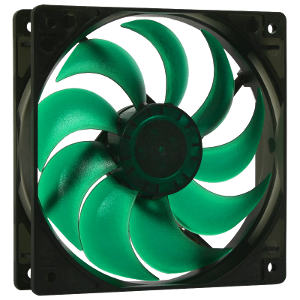
I learned of the Nanoxia fans through QuietPC.com. Sorting the list of their 120mm fans by noise, the Nanoxia Deep Silence 120mm fan stood out as the quietest fan giving 60 CFM (102 cmh), the “standard” 120mm airflow. The quieter fans on the list fall woefully short.

Not a huge fan of the green color, but they are very quiet fans. My NAS has two 120mm intake fans on the back of the HDD bays, so I may consider swapping those out for these fans. Along with considering them for my wife’s system and my radiator box.

The power supply will eventually be downgraded as well. An 860W Platinum PSU is overkill for this.

And again I’m relying on Fedora 24 for this currently with the latest supported Mellanox EN driver. They still are not supporting Fedora 25 as of when this gets published, and their support for CentOS gives me reason to believe they never will.

As for CentOS/RHEL (along with Ubuntu, Oracle, and SuSE Linux Enterprise Server) there is a newer driver. And I tried using CentOS to get that version. But it just would not work. Perhaps the 3.6 kernel in CentOS was causing the problem — Fedora is using the 4.8 kernel. I may look into it later, such as with the Zone 2 switch. Fedora 24 works for this

So that’s it for the Zone 1 switch. The Zone 2 switch will be coming shortly now that some of the hardware is on the way or already here.

One question no one seems to ask about diversity

Article:Diversifying tech: Yes, white men can be part of the solution and not the problem

Ah another piece of virtue signalling.

In other words, white men are the problem but can be part of the solution. This bashing of whites has definitely reached a fever pitch, and is likely the reason Clinton lost. I mean when minorities are walking away and throwing their support behind Trump because they don’t want to be associated with all the white-bashing, a change of focus is in order. Instead they’ve been doubling down.

And in technology, the white bashing has been happening for quite a while. Allegations that there aren’t enough women or minorities in tech. And to anyone who says that, look at any reasonably successful technology company and you’ll find plenty of women and plenty of minorities. Indeed at my previous employer, white men I doubt held even the plurality.

But these discussions on diversity often overlook one very key question: what is the diversity in the labor pool for the role?

Everyone seems to be presuming the diversity of the labor pool for every role matches the diversity levels of the general population. And that the only reason diversity in certain roles is not at parity with the general population is racism or misogyny.

Until you have diversity in the labor pool for a particular role, you obviously cannot have diversity within these roles.

So what is the level of diversity in the labor pool for the various technology roles? Answer that question first before you start demanding diversity and declaring white men to be the problem.

Again, Amazon?

I’ve written of several problems I’ve had with Amazon. The one that still takes the cake is when I ordered the Shrek collection on Blu-Ray and received empty Blu-Ray cases.

This time around, I recently ordered several things from Amazon as part of the 10Gb home network upgrade project. Included in that order were two Nanoxia Deep Silence 120mm fans. I received only one. So I sent this message to Amazon through their customer service:

The order specifies 2 of the items selected, however I received only 1. Please alleviate the deficiency by shipping the missing item. As none of the automated return options allow me to request you send the missing item, since they all assume I’m returning something I actually received, I’m notifying through e-mail. Again please send the missing item.

Thank you.

Ugh…


10 gigabit (10Gb) home network – Part II

Build Log:

Before continuing, first a few notes on the previous iteration.

Firmware. FreeNAS’s driver for the Chelsio card complained about the firmware version. The card I received had the 7.07 firmware installed while the latest is 7.11, and the driver wanted the latest. It was in a security output e-mail. Upgrading the firmware was pretty straightforward, though. The instructions are the same as on Linux, and the tools come with FreeNAS/FreeBSD.

But something to keep in mind if you decide to buy 10Gb cards to create a 10Gb network: you may need to upgrade firmwares. The Mellanox cards all had the latest firmwares.

Active cooling. On the Mellanox MNPA19-XTR, the mounting holes for the single-port ConnectX-2 are 34mm apart, and the heatsink is 45mm by 35mm. I don’t know of a heatsink that will fit this, but if you can attach a 30 or 35mm fan, you’ll likely be fine. The 34mm distance may be enough to attach a 25mm fan diagonally.

On the dual-port Mellanox card I received (PN: 81Y1541), the heatsink is 40mm square and the mounting holes about 47mm apart.

Not for two systems. This is something that should be very obvious from the outset: this project is not for just connecting two systems together. This project is for connecting multiple systems together onto a 10GbE network.

This is also for small setups — four to six 10GbE connections. If you need more than that, you should really be looking at off-the-shelf 10GbE switches, such as the Netgear ProSAFE XS708Ev2 (10GbE Cat6a RJ45) or Dell X4012 (10GbE SFP+).

System requirements and costs

Since the network cards can be had for pretty cheap — under 20 USD for the single-port, under 40 for the dual-port SFP+ cards — you might be tempted to find other ways of keeping costs low. And on this, the used and refurbished hardware market can be your friend. Mostly. You just need to know what to find.

PCI-Express. This is where you need to pay attention. At minimum you’ll need a mainboard that supports PCI-E 2.0. Slot configuration requires your attention here.

Every dual-port 10GbE card will require a x8 slot. Any single-port cards in the mix may be able to get away with a 2.0×4 slot depending on the card. So look for a mainboard that can provide the PCI-E slot configuration you’ll require.

On the Intel platform, you’ll need to pay attention to the processor you select to ensure you get an adequate lane count. Most Intel processors support at most 16 lanes. A PEX chip won’t help much in this. To get more lanes, you’ll need either an “extreme” processor, such as the i7-3930k (40 lanes), or a Xeon, possibly even a dual-Xeon depending on generation.

Core count. You will need at least a quad-core processor for this. Beyond that you’ll want at least 1 core per SFP+ port.

The reason for this IRQ Affinity. In brief, every hardware event that occurs on your system is processed via a hardware “interrupt”. Affinity determines what core processes that interrupt via the Advanced Programmable Interrupt Controller (APIC). More physical cores = more interrupts that can be processed in parallel = better throughput on your switch.

AMD or Intel? Whether you go AMD or Intel is entirely up to you. While Intel processors do tend to out-perform AMD processors, it won’t provide you much benefit here. As noted above, PCI-E lane count will matter more.

And this is where AMD wins out, in my opinion, since the lane count isn’t tied to the processor. On that, however, I can really only recommend the 990FX chipset.

The 990FX chipset provides 42 lanes, typically as 2×16, 1×4 or 2×4, and 2×1, allowing two dual-port cards and maybe one or two single-port depending on model. Some 990FX mainboards have a better lane spread, providing 1×16 and 2×8, allowing up to three dual-port cards while still retaining the 2×4 slots as well. Only one 990FX mainboard I’m aware of provided for 4×8 slots: Gigabyte GA-990FXA-UD7.

Which four or six 10GbE ports should be more than enough for most setups. Again, if you need more than that, you should really be looking at an off-the-shelf 10GbE switch.

Operating system

I considered two operating systems for this: VyOS and Fedora 24 Server.

Note on VyOS and installing from USB: you need to make sure to write the ISO image to disk using DD mode or it won’t boot. And when booting off the USB stick, make sure it is plugged into a USB 2.0 connection. It will fail to boot if you try to boot from a USB 3.0.

It’s pretty easy to create a switch with VyOS as well. Their configuration options are relatively straightforward. And using the video I embedded in the earlier section as a guide had a switch working relatively quickly.

But you may want to consider going with an off-the-shelf Linux distribution instead. Why? Driver support.

For Chelsio cards this isn’t nearly as huge a deal. The latest Chelsio drivers for the T3 chipset (which includes the S320 in my NAS) were released in 2010. But for the Mellanox ConnectX-2, I recommend you consider against using VyOS.

VyOS 1.1.7 is built from Debian 6 “Squeeze”, which was initially released in 2011, the latest version released in 2014, and went out of long-term support in February 2016. The latest Debian is 8.6, which is what VyOS 1.2 will be based on.

The oldest Debian version supported by the Mellanox EN driver, as of the time I write this, is Debian 7.6. The Mellanox driver supports the latest or nearly latest available version for

  • SuSE Linux Enterprise Server (SLES)
  • Oracle Linux (OL)
  • Fedora
  • CentOS
  • RedHat Enterprise (RHEL)
  • Ubuntu

So if you are using Mellanox cards, which seems to be the brand most widely available, consider using an off-the-shelf Linux distribution to build your switch. Just make sure to install it using a minimal install since you don’t need really much of anything for this.

For this setup, I’ll be using Fedora 24. Fedora 25 is the latest version as of when I write this, but Mellanox has not yet released a driver installer that supports it as of the time this article went live. When installing the driver on a kernel the installer doesn’t readily support, you will be walked through rebuilding the driver for your kernel version — what packages to install, what command line options to include, etc.

First test

Before building the switch I intend to use, I wanted a proof of concept. At the same time this was going on, I was also buying parts to build two systems for a lesbian couple I know, so I had a system set up on a test bench near the NAS and virtualization server with these specifications:

  • AMD Athlon X4 860k (stock speed)
  • Gigabyte GA-F2A88X-D3HP
  • 4GB Corsair Vengeance DDR3
  • 64GB ADATA SSD

Since this was already on a test bed, I just used it to drop in the 10GbE card and work out any gotchas. As mentioned above, the OS I used is Fedora 24 Server.

Creating the switch is relatively straightforward. One line to create the bridge, and two additional lines per interface you’ll include into it, as this script demonstrates:

ifconfig enp3s0 0.0.0.0
ifconfig enp1s0 0.0.0.0
ifconfig enp1s0d1 0.0.0.0

nmcli connection add ifname zone1bridge type bridge con-name zone1bridge
nmcli connection add type bridge-slave ifname enp1s0 master zone1bridge
nmcli connection add type bridge-slave ifname enp1s0d1 master zone1bridge
nmcli connection add type bridge-slave ifname enp3s0 master zone1bridge

Setting the IPs on the interfaces to 0.0.0.0 throws them into promiscuous mode. This is needed for the bridged interfaces to act as a switch. Additionally I also disabled the firewall. Then I turned my attention to the NAS.

In FreeNAS, I disabled DHCP on the onboard Gigabit connection and assigned it a temporary static IP. Then I added the 10Gb connection and enabled DHCP for it. Once it had an IP address from the router, I removed the Gigabit NIC from FreeNAS’s list of interfaces, unplugged the NAS’s Ethernet cable, then rebooted the system to refresh all of its networking-related caches and settings.

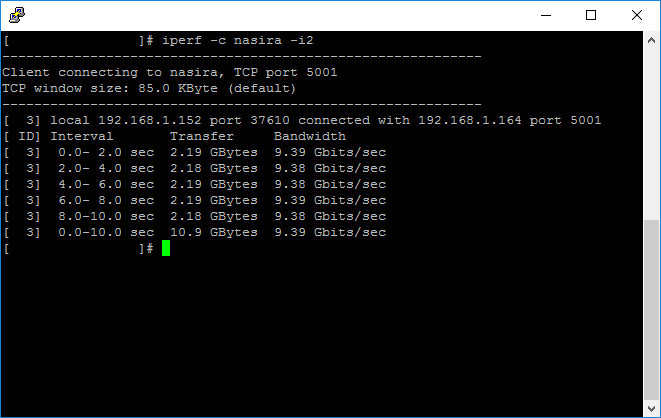
DNS picked up the NAS across its 10Gb connection, and I was able to ping it successfully from my desktop and the switch. So with that, I ran iperf between the switch and NAS to get an initial bandwidth report:

iperf_test

9.39 Gbits/sec = 1.17 Gigabytes/sec. That’s about as good as it’s going to get. The Linux ping utility gives about .065ms (about 65μs) for the round-trip time between the NAS and switch, which is an ultra-low latency and what I’d expect from optical fiber.

So this tells me that, at least between the switch and the NAS, everything is working clean. Time to move on to the actual hardware I’ll be using.

Second test

The second test was a similar bench test setup with what will likely be the final hardware for the switch:

  • CPU: AMD FX-8320E
  • Mainboard: ASRock 990FX Extreme6
  • Memory: 4GB Corsair Vengeance DDR3

And this is with a clean install of Fedora 24 Server — Minimal Install with with the Mellanox drivers installed, using the instructions above to create the bridge. There isn’t anything more that you really need to do for this either, not unless you’re anal about getting the max throughput possible for this setup, squeezing every last Mbit/sec out of it.

In this setup I also had the virtualization server plugged into the switch along with the NAS. For VMWare ESXi, it will not automatically grab an IP address via DHCP for the new adapter unless you specifically tell it to do so through the console interface.

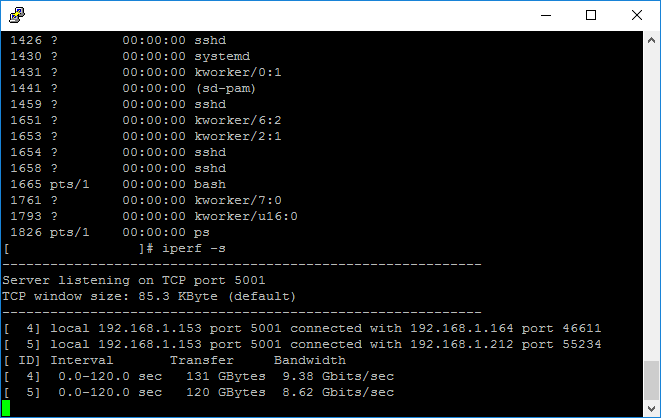
For performance testing I ran iperf from two machines separately, both talking to the switch. One connection from a Linux VM on the virtualization server, the other from the NAS.

iperf_test_2connections

The VM was not able to saturate the connection as well as the NAS, but that was expected given the way VMWare ESXi tries to handle networking via a virtual switch. The NAS saturated its 10Gb connection — again, about 9.38Gbits/sec is likely as good as that’s going to get.

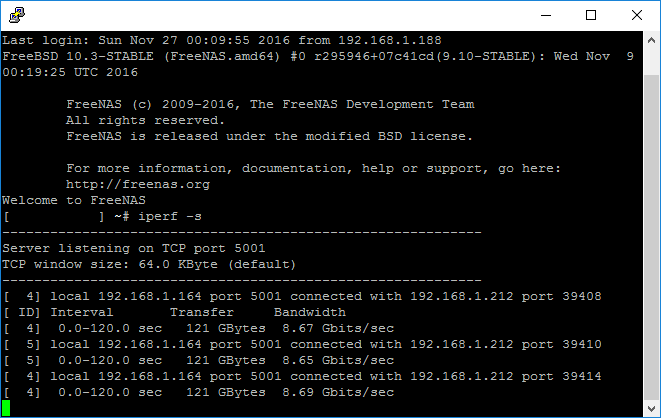
For another test, I installed the second 10Gb NIC. Both x16 slots on the mainboard had the 10Gb NICs and the x4 slot had the graphics card. I connected the NAS to the single-port card, added it into the bridge, then rebooted the switch so the network changes would take.

I was looking for any indication of a performance degradation sending data between the NICs across the PCI-Express bus.

iperf_test_between_nics

As you can see above, I ran three tests just to be sure. The PCI-Express bus on the 990FX chipset is not a bottleneck between the NICs.

Now I just need to finalize the setup. I’m not settled yet on whether this will go into a 2U or 4U chassis, though it’ll likely be the latter to allow for a full-size power supply and quiet 120mm fans for cooling while avoiding having to find low-profile brackets for the NICs.

So the next part will be finalizing the Zone 1 switch and figuring out what I need for the Zone 2 switch.